For years, one of the biggest complaints around Windows 11 has been how restrictive the interface feels compared to older Windows versions. From the oversized Start menu to the locked taskbar position, many longtime PC users felt the operating system took away customization features that were once standard. Now, it looks like Microsoft is finally listening to that feedback in a pretty big way.
The company has started testing a fresh batch of experimental features for Windows 11 through its Windows Insider program, and some of these additions could completely change how people use the desktop experience every day. The update mainly focuses on giving users more control over the Start menu layout and taskbar placement, two areas that have constantly frustrated users since Windows 11 first launched.
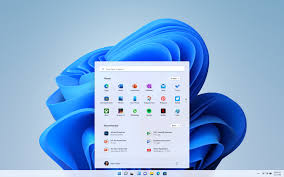
One of the most noticeable upgrades is the ability to resize the Start menu. Right now, many users feel the current Start layout wastes too much screen space, especially after a controversial update last year reportedly made the menu almost twice as large. The new test build introduces Small and Large menu options, letting users decide how much space they actually want the menu to take. Once selected inside the settings, the size will reportedly stay consistent across different monitors as well, which is useful for people working with multi-display setups.
Microsoft is also introducing more detailed controls for different Start menu sections. Instead of forcing everyone into the same layout, users can now individually show or hide areas like Pinned apps, Recommended files, and the All apps list. That means someone who only wants a clean launcher for apps can remove the clutter completely and keep only the essentials visible. It’s a small change on paper, but for daily usability, it could make Windows feel far less bloated.
Another interesting privacy-focused feature is the ability to hide your profile picture and account name from the Start menu. That may not sound huge at first, but it’s actually useful for people who stream, record tutorials, present during meetings, or share screenshots online. Microsoft is also adding separate controls for file recommendations so users can disable suggested files in the Start menu without affecting recommendations elsewhere in Windows.
The bigger surprise, though, is the taskbar update. Ever since Windows 11 launched, users have repeatedly asked Microsoft to bring back the freedom to move the taskbar anywhere on the screen like older Windows versions allowed. Now the company is finally testing exactly that. Insiders will be able to place the taskbar on the top, bottom, left, or right side of the display depending on their workflow preferences.
Microsoft is also experimenting with icon alignment controls tied to the taskbar’s position. If the taskbar sits vertically on the left or right side, users can choose between centered or top-aligned icons. For the traditional top or bottom positions, the options remain left-aligned or centered. It may sound like a basic feature, but longtime Windows users have been requesting this level of flexibility since the day Windows 11 arrived.
The changes are currently rolling out only to users enrolled in the Windows Insider Experimental Channel, meaning regular users may still need to wait before these features arrive publicly. The Insider program allows testers to try early Windows builds and send feedback directly to Microsoft before features are finalized for wider release.
What makes this update feel important is that it signals Microsoft may finally be moving away from the “one-size-fits-all” approach that defined early Windows 11 updates. The operating system has often been criticized for simplifying things too aggressively compared to Windows 10, especially for power users who like deeper customization. These new tests suggest the company is slowly bringing back some of the flexibility people missed.
According to Engadget, the features are rolling out gradually over the coming weeks for Insider users, so not everyone will see them immediately. Still, the reaction online already seems far more positive than many recent Windows experiments, mainly because these are changes users have been demanding for a long time rather than features nobody asked for.