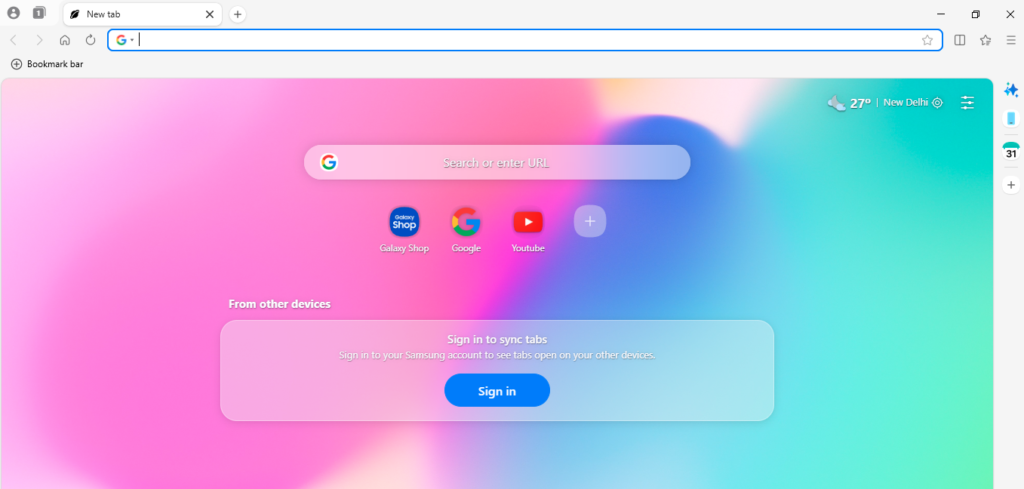
Samsung is stepping beyond its mobile ecosystem in a big way. The company has officially launched the Samsung Browser for Windows, marking its first serious move to bring its in-house browsing experience to desktop users. Previously available only on Samsung smartphones and tablets, the browser is now making its way to PCs running Windows 10 and Windows 11—bringing with it a strong focus on cross-device continuity and next-generation AI features.
At a time when browsers are evolving from simple web tools into intelligent assistants, Samsung’s entry into the Windows space signals a clear shift in strategy. It’s no longer just about browsing—it’s about how users interact with information across devices.
A Familiar Mobile Experience, Now on PC
For long-time Samsung users, the biggest appeal of the new browser lies in continuity. The company has designed the Windows version to seamlessly connect with its mobile counterpart, allowing users to move between devices without losing their place.
This means that if you were reading an article, researching something, or browsing multiple tabs on your phone, you can continue exactly where you left off on your PC. Tabs, bookmarks, and browsing history are all synced automatically, creating a unified browsing experience across devices.
In a world where users frequently switch between smartphones and desktops, this kind of integration is quickly becoming essential rather than optional.
Availability and Rollout Strategy
Samsung Browser for Windows is now available for download on systems running Windows 10 (version 1809 and above) and Windows 11. However, not all features are immediately accessible worldwide.
The company has confirmed that its AI-powered capabilities are currently limited to South Korea and the United States, with plans to expand to additional regions in the future. This phased rollout suggests Samsung is testing and refining its AI features before making them globally available.
Built-In AI: More Than Just a Search Tool
The biggest highlight of Samsung’s new browser is its integration of agentic AI, developed in partnership with Perplexity. Unlike traditional browser search functions, this AI assistant is designed to understand natural language and context—making interactions feel more conversational and intuitive.
Instead of typing keywords, users can ask full questions or give instructions, and the browser responds with relevant, structured information. This shift from keyword-based search to context-based interaction is part of a broader trend across the tech industry.
What sets Samsung’s approach apart is how deeply the AI is integrated into the browsing experience itself.
Multi-Tab Context Awareness: A New Way to Browse
One of the standout features is something Samsung calls Multi-tab Context Awareness. In simple terms, the browser can analyze multiple open tabs at once and pull together insights from across them.
For example, if you’re comparing products, reading reviews, or researching a topic, the browser can summarize key points from different pages into a single, easy-to-read view. This eliminates the need to manually switch between tabs and piece together information.
It’s a feature that could significantly change how people research, shop, or even plan trips online.
AI That Works With Your Workflow
Samsung’s AI isn’t just about answering questions—it’s designed to assist with tasks. Users can ask the browser to summarize long articles, organize tabs, or even create content based on what they’re viewing.
For instance, if you’re browsing travel websites, you can ask the browser to generate a travel itinerary based on the information available. The AI can also search within videos to find specific moments, saving users from manually scrubbing through content.
Another useful addition is the ability to retrieve previously visited pages using natural language. Instead of remembering exact keywords or dates, users can simply describe what they’re looking for, and the browser will locate it.
Samsung Pass Integration Adds Convenience
Security and convenience are also part of the package. The browser integrates with Samsung Pass, allowing users to store login credentials securely and autofill them across devices.
This feature not only saves time but also reduces the friction of managing multiple accounts—a common pain point for many users.
Competing in a Crowded Browser Market
Samsung’s move into the Windows browser space puts it in direct competition with established players like Google Chrome, Microsoft Edge, and Mozilla Firefox. Each of these browsers already offers strong performance, extensions, and ecosystem integration.
However, Samsung is betting on two key differentiators: cross-device continuity and AI-driven functionality.
By focusing on users who are already part of the Samsung ecosystem, the company is creating a more connected experience that competitors may find harder to replicate.
The Bigger Picture: Browsers Are Evolving
The launch of Samsung Browser for Windows reflects a larger trend in the tech world. Browsers are no longer just gateways to the internet—they are becoming intelligent platforms that assist users in navigating information.
With AI integration becoming a standard feature, the competition is shifting from speed and design to intelligence and usability.
Samsung’s partnership with Perplexity also highlights how companies are increasingly collaborating to build smarter tools rather than developing everything in-house.
What This Means for Users
For everyday users, this means more convenience, less manual effort, and a more personalized browsing experience. Tasks that once required multiple steps—like comparing information, summarizing content, or finding old pages—can now be handled with simple commands.
For Samsung users specifically, the added benefit of seamless syncing across devices makes the browser even more appealing.
Final Take: A Smart Step Into the Future of Browsing
Samsung’s entry into the Windows browser market may seem late, but it arrives at a time when the rules are changing. By focusing on AI and cross-device integration, the company is positioning its browser as more than just another option—it’s aiming to redefine how people interact with the web.
Whether it can compete with established giants remains to be seen. But one thing is clear: the future of browsing is no longer just about speed—it’s about intelligence.
And with this launch, Samsung is making sure it’s part of that future.